


SiteViewer
Client feedback, on your own domain.
Your clients click the spot and type. Every comment lands pinned to the page, on any live site, HTML file or PDF, under your logo and your address. No login for your client.
Enter it at checkout when you upgrade.
Free plan · 5 projects · no card
A SiteViewer review room, sent from your domain
One link for every round of client feedback.
No more WhatsApp voice notes, cropped screenshots and "the top bit looks weird". SiteViewer puts every comment on the page it belongs to, and the whole review goes out under your studio's name.
Click the thing. Say the thing.
Each comment sticks to the element it is about, with a screenshot, browser and screen size attached. No account needed for your client.
Your name on every link.
Point a subdomain at SiteViewer. Your logo and colours on the password screen, SSL handled for you.
Hand the list to your assistant.
Turn comments into prompts, copy them as Markdown, or connect Claude Code, Cursor or Codex over MCP.
SiteViewer for Squarespace
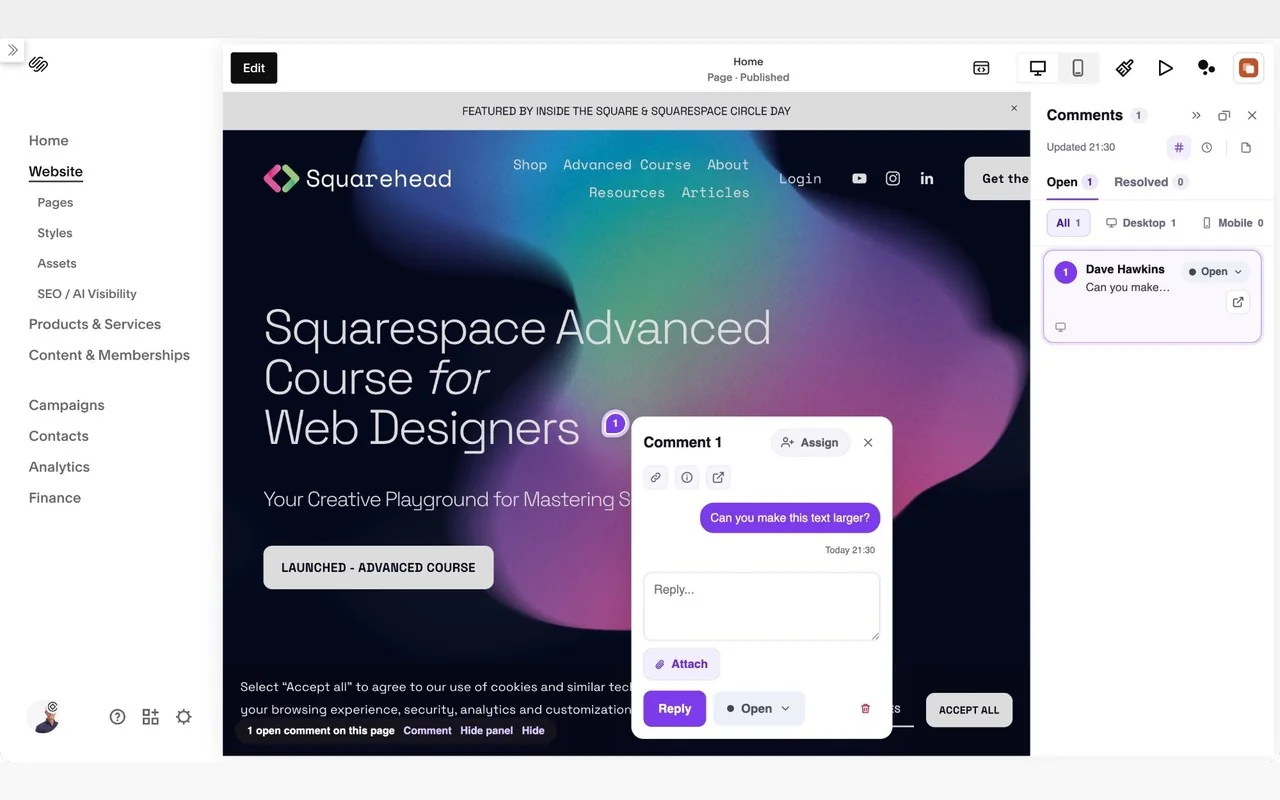
Your clients' comments, right inside the Squarespace editor. Every note shows as a pin on the spot it is about, so you fix it there and then. No switching tabs, no squinting at screenshots.
- Every pin on the page. Numbered pins appear on whichever page you open in the editor.
- The whole list beside it. A panel lists every comment, filtered by desktop or mobile. Click one to jump to its pin.
- Reply, assign and resolve. Answer the client, hand it to a teammate or mark it done without leaving the editor.
- 1Add it to Chrome
- 2Connect your SiteViewer account
- 3Open your site in the editor
Included with the Studio plan. New accounts get a 14-day Studio trial, no card needed.
Free
- 5 projects: HTML, PDF and images
- Password protection
- 1 seat
Pro
- Unlimited HTML and PDF projects, plus 1 live website
- Your own domain with SSL, and a white-label password page
- File requests and transfers up to 1 GB
- Pre-launch checks for mobile, accessibility and copy
- Alerts when a client opens a link, and emails sent in your name
- Connect your AI assistant
- 3 seats
Studio
- Everything in Pro, plus:
- Pinned client comments on any page, including live websites
- Unlimited live websites
- Comment from inside the Squarespace editor
- Draw on images and comment on PDF pages
- Private team comments, with assign, resolve and filter
- Turn feedback into a prompt for your AI editor
- Slack notifications
- 10 seats, and previews that never expire
Every new account starts with 14 days of Studio, no card needed. Prefer to pay once? Studio Lifetime is $399, with no renewal. Prices in USD, excluding VAT.
Upgrading? Use code Circle at checkout.
See every SiteViewer featureThe bits Squarespace left out.
Plugins we built for our own client work, now available to every Squarespace designer. They run inside your admin, nothing goes through a third party server, and one payment covers every site you build.
Events Pro Bulk Editor
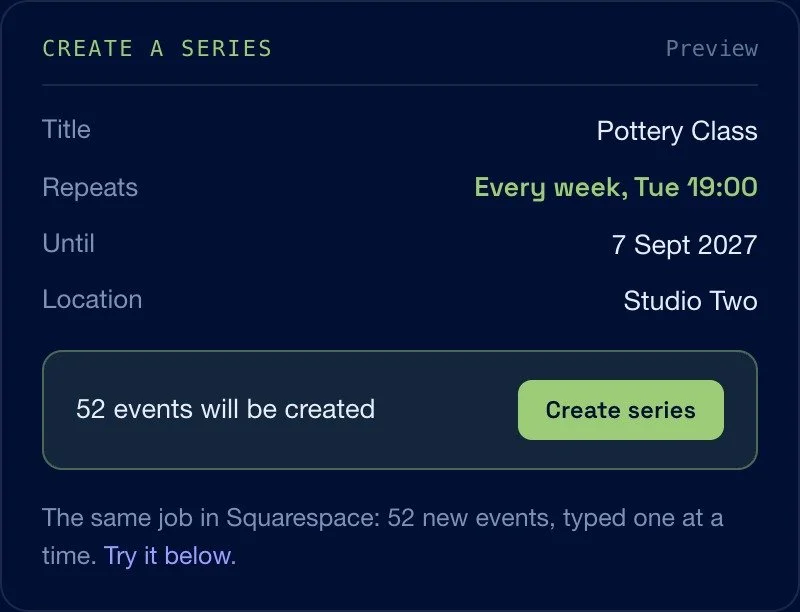
Recurring events and bulk editing for Squarespace Events, at last.
- Build a weekly, fortnightly or monthly series from one pattern
- Change dates, venues, categories and status across a selection
- Merge duplicate venues and tidy messy event URLs
Asset Manager
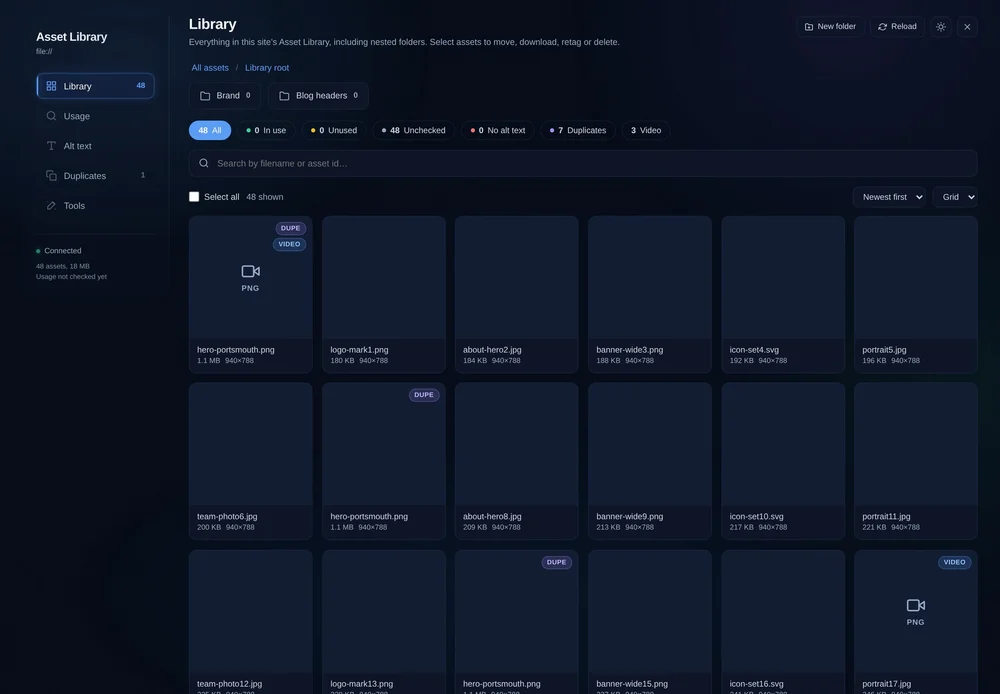
Find out which images your library actually uses, and where.
- Used, unused and uncertain, down to the block
- Real duplicates grouped, with the in-use copy kept
- Alt text drafted, edited and verified on the live site
Blog Bulk Editor
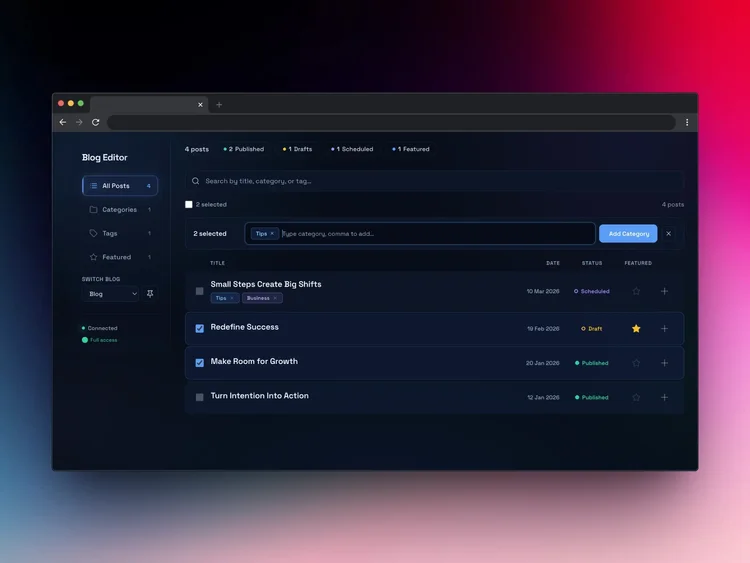
Your whole blog in one dashboard, on 7.0 or 7.1.
- Add or remove categories and tags across many posts
- Rename or merge duplicates in one pass
- Publish, draft or feature in bulk, with full revert
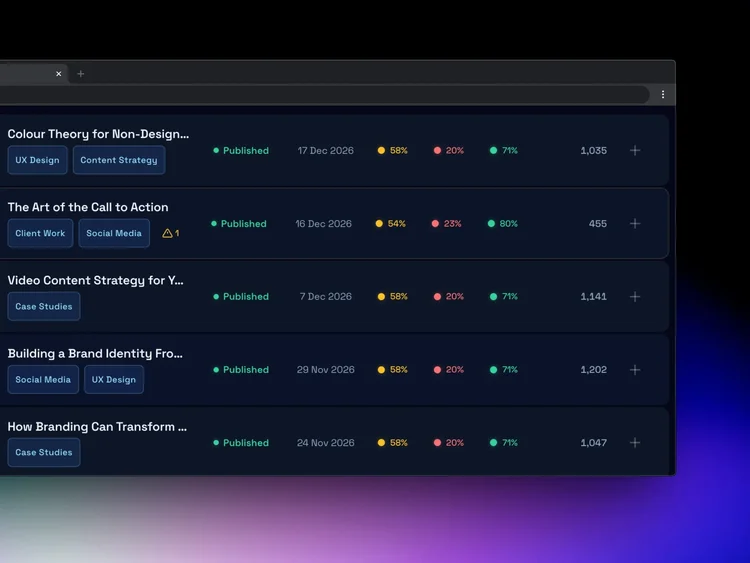
Bulk Blog Uploader
Hundreds of posts from a spreadsheet, Notion or JSON.
- XLSX, CSV, JSON and Notion exports
- Review and edit every post before it goes live
- A health report grades each post first
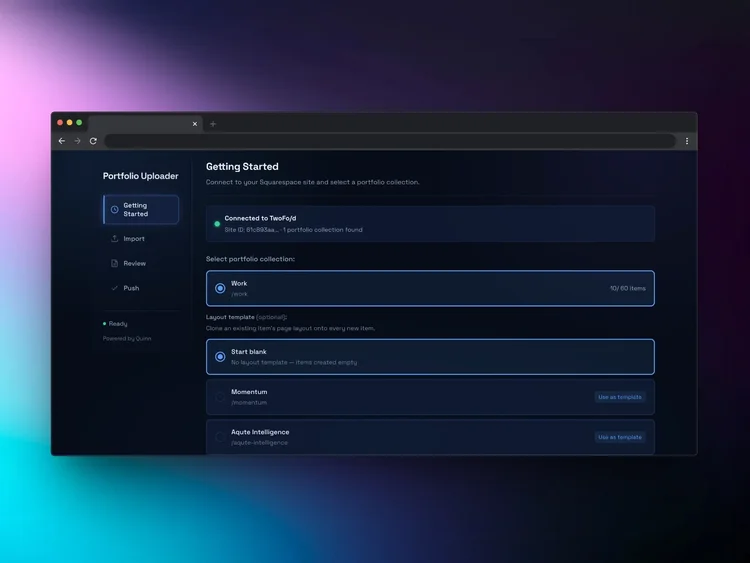
Bulk Portfolio Uploader
Fill a portfolio collection from one spreadsheet.
- CSV, Excel or JSON with smart field mapping
- Catches missing titles and duplicate slugs
- Clone one layout onto every new item
 Code Block Editor+
New in 4.0 · Create
Code Block Editor+
New in 4.0 · Create
Claude builds the section. Your client edits it.
Ask Claude for a section and it lands straight in your Code Block, in your site's style. Your client then edits the text, links, images and colours in plain fields, and the design stays intact. Create runs on your own Claude subscription.
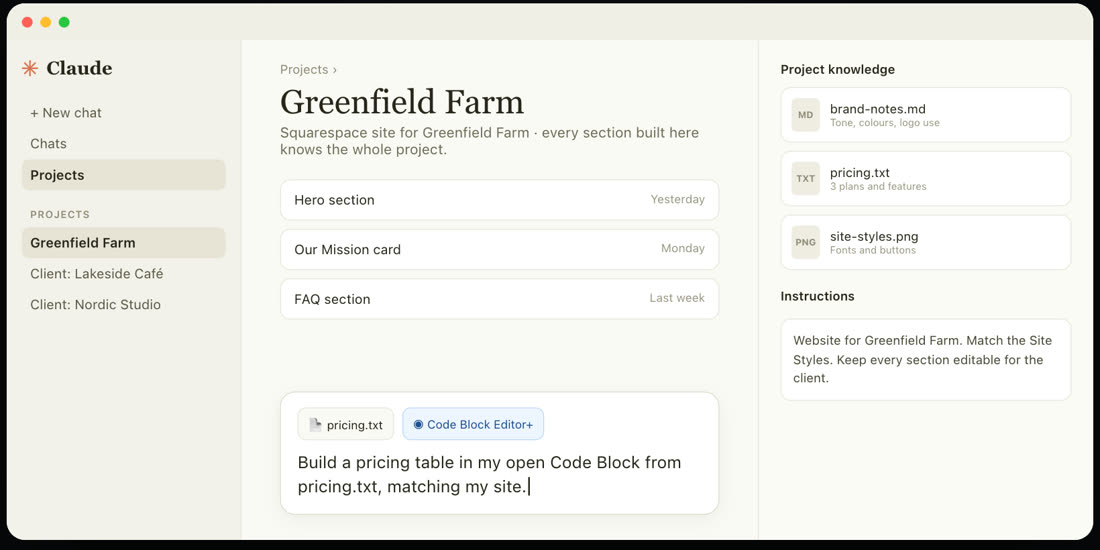
For youCreate, with Claude
Matches your site
Sections come out in your site's own fonts, colours and buttons.
Straight into your Code Block
It lands as editable fields. Nothing goes live until you click Save.
Knows your project
Brand notes, pricing and styles from your Claude project feed every section.
Your own Claude subscription
No API keys to set up, and it is included with every licence.
Ready to hand over
Everything Claude builds is client-editable from the moment it lands.
Only for you
Create only shows in your browser. Your client never sees it.
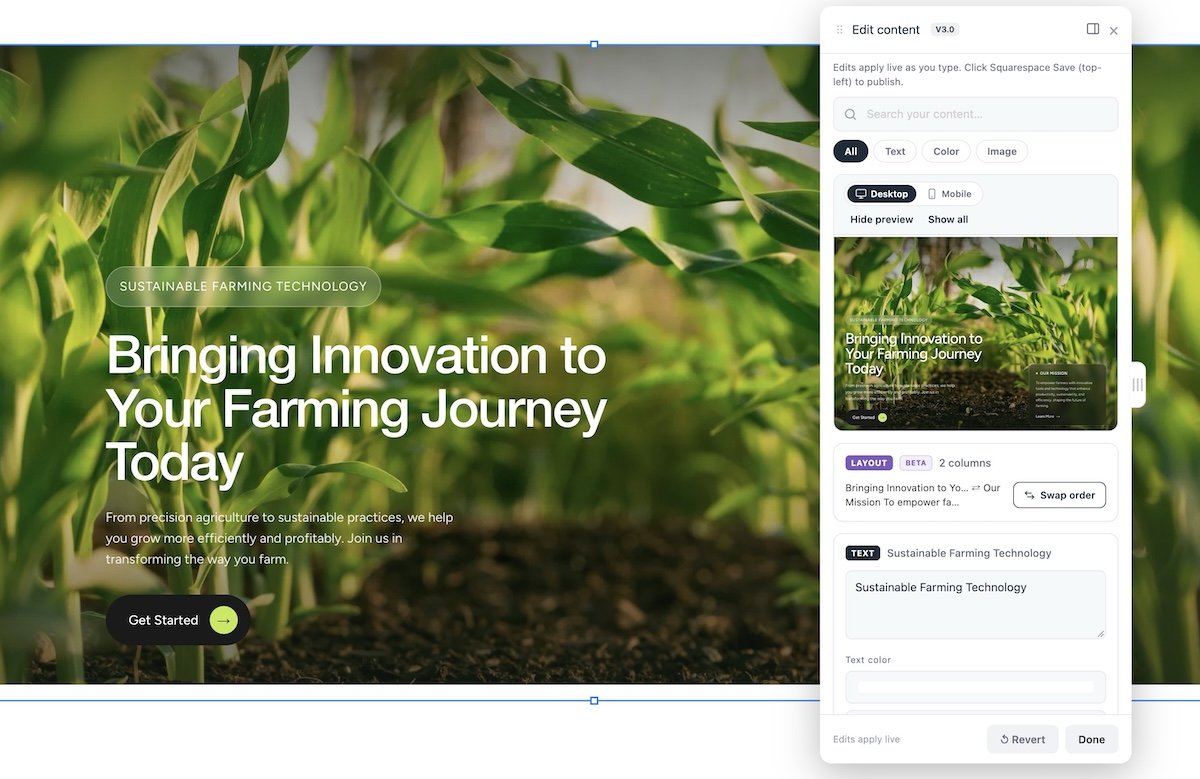
For your clientEdit, without the code
The editor reads the HTML already in the block, hand-written or AI-built, and turns the changeable parts into plain fields. Structure, styling and animation stay untouched.
- Opens itself when a Code Block is opened, docked beside the page
- Swap images from the site or Asset Library, no files emailed over
- Add, remove and reorder repeated items like FAQs and cards
- Undo one step at a time, or revert everything at once
- A separate size for phones, without touching desktop
- Search and filter fields by text, colour or image
Small edits add up. Nine client sites, six quick changes a year each, fifteen minutes a time, is around 14 unbilled hours. Nine licences cost $270, once.
Built by SQS Mods. One licence per site. No effect on published pages, the panel only loads while you edit.
 Dave Hawkins
Built by someone who lives in Squarespace.
I'm Dave, founder of Made by Dave. Since 2014 we've built over 650 Squarespace sites, for clients including the NHS, Skyscanner and CUNY.
SiteViewer and every Squarehead tool started as a fix for something we kept running into on client work. When you email for help, you get me.
Runs in your admin
Paste one snippet into a Code Block. It uses the session you are already signed in to.
Nothing changes until you say
Every edit is tracked and reviewable, with a full revert before anything is saved.
Pay once, use everywhere
No subscriptions. Unlimited sites and free updates on every tool.
Support from the builder
Questions go to the person who wrote the code, not a ticket queue.

Send your next review link with SiteViewer.
Five projects free, no card. Add your own domain when you are ready, and use the code below when you upgrade.
Enter it at checkout when you upgrade.
Can the logo be a touch bigger on mobile?